A note on the visuals: I was a contractor, so the original files stayed with Walgreens. The screens here are recreated for my portfolio. The notebook sketches are my originals.
01 · The stakes
COVID made curbside urgent.
Nobody had a system for it yet.
Customers needed a fast, low-contact way to get their orders, and Walgreens needed them using it as soon as possible. One pickup touched checkout, order systems, geolocation and the store's own software at once.
02 · The room
Four teams. One pickup moment.
I designed the moments between them.
Each team owned its piece of curbside. I led the UX for mobile and made sure the customer saw the right thing every time another team's system answered.
The question we kept asking
How does a store know you're coming,
and what do you see while you wait?
03 · The flow
Two triggers, one email, someone walking out to your car.
"Ready" wasn't automatic. An associate had to say so, and that kicked off everything else. I designed what the customer sees at each step.
The store gets a signal to start pulling the order before the customer arrives.
Location on: the geofence notifies the store automatically. Location off: tap "I'm Here," add vehicle details, submit.
04 · Process
It started on graph paper.
I sketched the On My Way states, the vehicle form and how nearby-store stock should show up, then turned them into wireframes for every step.
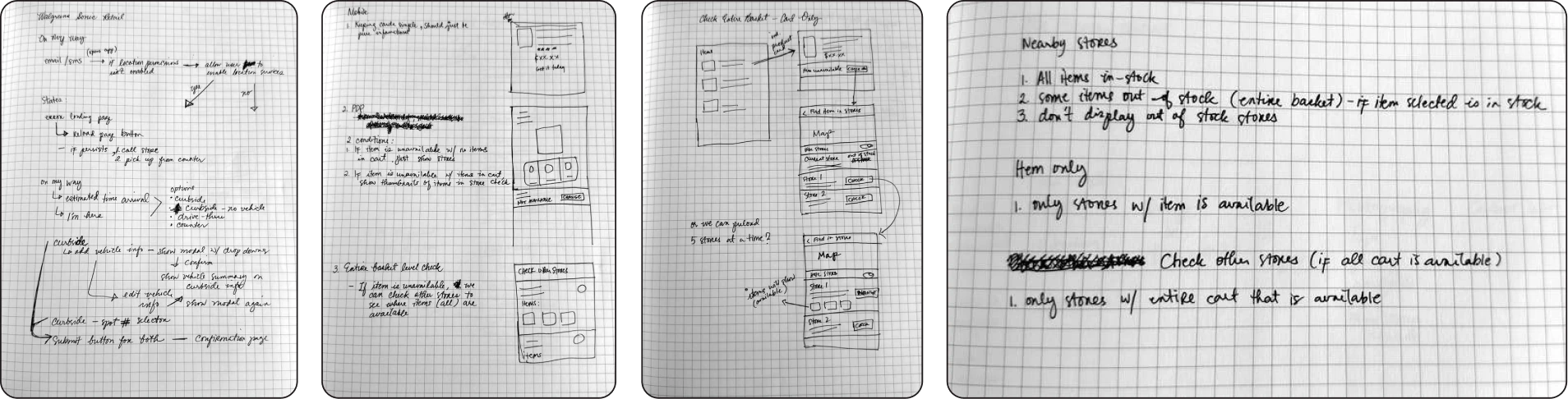
Reconstructed for this portfolio from my notes. It shows the project structure, not the original artifact.
05 · The handoff
I owned the wires. A UI designer owned the pixels.
At Walgreens, UX and UI are separate roles. These are examples of the wireframes I handed to the UI designer: eight key moments, from checkout to the curb. The final visuals stayed with Walgreens, so this is the part of the work that was mine.
Ready in as little as 30 min if ordered 1 hr before close.
Delivers in 1–2 hours if ordered by 6 pm.
Free on orders over $35.
Cancel
Pickup at checkout
Pickup, same day or shipping per item, with timing and price up front.
Pickup, same day or shipping is chosen per order, with the store up front, so nobody picks a store that can't fill it.
Mon 2:14 PM
Mon 2:52 PM
The "ready" text
Sent when the associate marks it ready. One link covers both moments.
A text and an email carry both moments, "I'm on my way" and "I'm here," so customers don't need the app to use curbside.
Hi Ash, your order is ready for pickup!
For even faster pickup, let us know when you're on the way!
Store #0000
123 Main St
Anytown, IL 00000
Mon–Fri 8am–10pm
Sat–Sun 9am–9pm
Choose your pickup method
Arrive between 9am and 9pm.
Park in a curbside spot, then tap "I'm here" below.
Check your store's drive-thru hours.
Once you're in the drive-thru, we'll hand it through the window.
The "ready" email
One email, two moments: "On my way" starts the prep, "I'm here" brings it out. Curbside or drive-thru is explained below.
A text and an email carry both moments, "I'm on my way" and "I'm here," so customers don't need the app to use curbside.
Order #00000000 · Store #0000
- We pull your items and bag them.
- When you arrive, tap "I'm here" in your email, or we'll know if location is on.
- A team member brings it to your car.
On my way
Tapping "On my way" tells the store to start pulling the order.
We'll let the store know when you're within 2 miles, so your order is ready when you pull up.
Not now, I'll tap "I'm here"
Allow While Using App
Allow Once
Don't Allow
Location in the app
The app asks for location services, so the 2-mile geofence can tell the store you've arrived.
With location on, the 2-mile geofence tells the store. With it off, a short vehicle form does the same job.
Your order is ready! Choose how you'd like to pick it up, or get it in-store at the photo counter.
Choose a pickup optionDrive-up or pick up
Every way to meet the order, with unavailable options and limits shown up front.
Drive-thru can't take liquids or bulky items, so the wires steer those orders to curbside before anyone shows up.
Store #0000 · 123 Main St
"I'm here" fallback
For anyone with location off: just enough to find the car.
With location on, the 2-mile geofence tells the store. With it off, a short vehicle form does the same job.
We're collecting your order now. A team member will be right out with it.
View the pickup FAQs
The handoff
Confirmation, plus a way out if something goes wrong.
06 · How I led it
Leading the UX while my lead was stretched thin.
- Ran UX for mobile shop and checkout day to day while my design lead and manager covered other projects.
- Kept web, backend and in-store software working from one flow, without authority over any of them.
- Partnered with the service designer the VP of Product brought in, so the blueprint and my flows matched.
- Handed my wires and flows to a UI designer, then handed off the full package when my six-month contract ended.
07 · The results
Released nationwide, built for speed.
Walgreens wanted customers using curbside as soon as possible. Two triggers gave them a fast way in, with or without location turned on.
More case studies
Thanks for reading.
Head back home, or browse the rest of my work.